
The Best SQLite Editor is the One in Your Editor
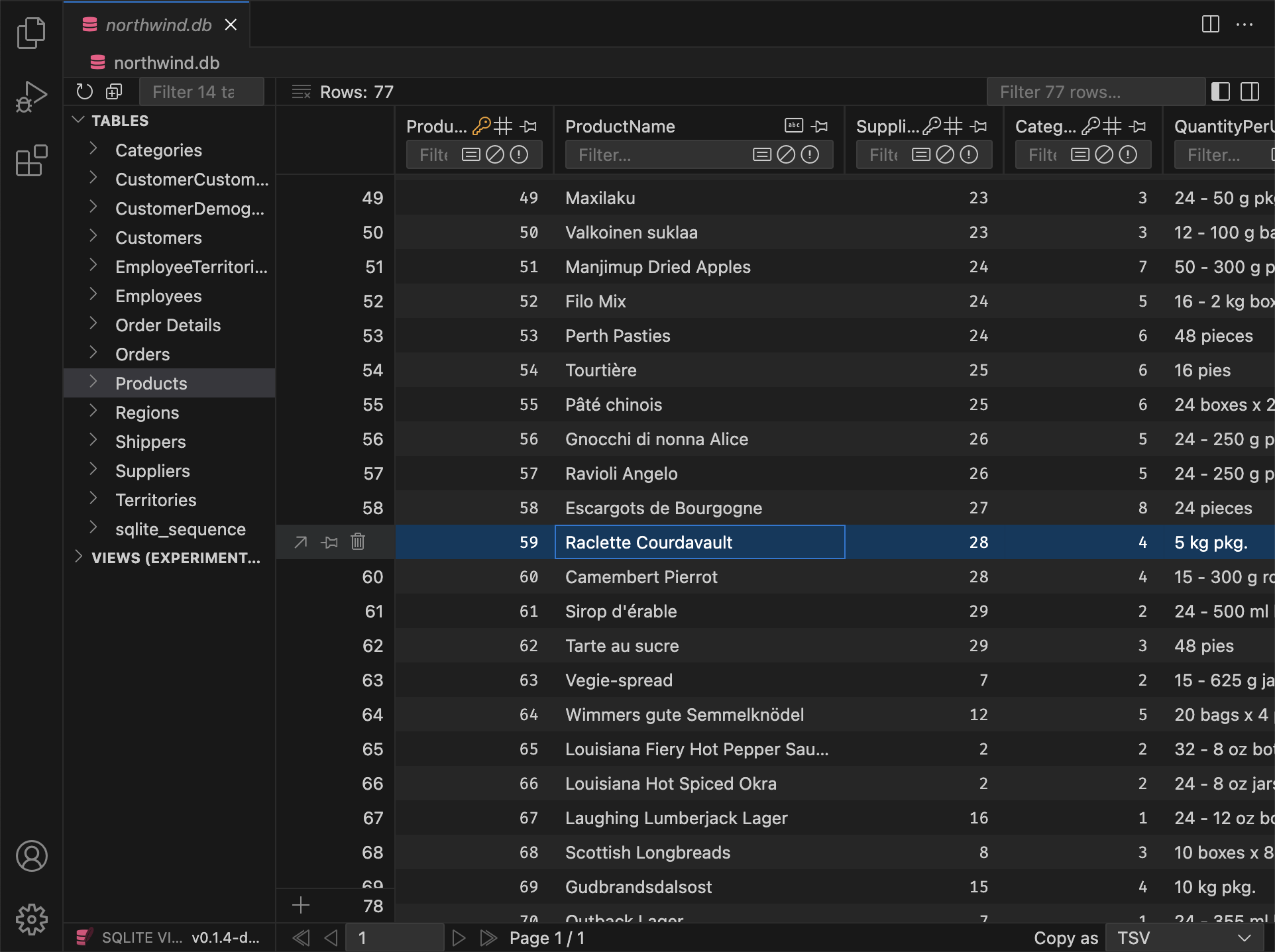
Get work done without leaving VS Code. Unlock powerful editing and export features. Works anywhere, including SSH and WSL.



 & others*
Upgrade to unlock exclusive PRO workflows
SQLite Viewer PRO unlocks new workflows. With its deep integration into VS Code, it enables some workflows that are unique and not possible with any other SQLite editor.
Re-engineered for PRO demands
You can think of the PRO version as SQLite Viewer 2. It's not just feature flags, but a completely new engine under the hood. Comes with SQLite failover guarantees and large file support.

Native SQLite Client
The PRO version uses the canonical SQLite implementation, which provides the full set of failover guarantees. The old readonly client remains as a fallback.

Large File Support
All restrictions on file size are lifted, even during remote sessions. Only the data needed to render the UI is transferred to your local machine. Powered by VS Code Server.

Ad-Free Experience
PRO customers enjoy an ad-free experience — perfect for screen sharing and recordings. Additionally, PRO customers receive an exclusive PRO icon ( ) in the UI.
Includes everything you like about the free version
Upgrading to SQLite Viewer PRO is a seamless experience. Just enter the license key and you're good to go. In addition to new and exclusive PRO features, everything you like about the free version stays as is.

Performant UI
SQLite Viewer is built with performance in mind. It uses the best tools the web stack has to offer and is routinely tested on older hardware to ensure performance remains top-notch.

Matching Theme
Say goodbye to disjointed user interfaces. SQLite Viewer automatically adjusts to your VS Code theme and seamlessly blends into the existing VS Code experience.
One-Click Setup
SQLite Viewer doesn't rely on binaries on your machine. It ships its own, so that simply clicking 'Install' completes the setup. The entire extension weighs only 2.5 MB.

Works Anywhere
Whether you're using VS Codium, CodeSandbox, GitPod, Google IDX or other VS Code forks, SQLite Viewer adapts to its environment and provides as many features as possible.

Owner Operated
SQLite Viewer is crafted by a single, dedicated developer. It enjoys a coherent vision and attention to detail that is rarely found in purely commercial products.
& others*
Recent Updates
Stay up to date with the latest features and improvements in SQLite Viewer PRO.
v26.2.4 Preview
PRO Markdown Preview
Columns that store markdown can now be viewed with a rendered preview in the row detail modal. A switch lets you toggle between plain text and the rendered view; You can treat any TEXT column as markdown by cycling its type in the column header (same gesture as for date/datetime). Declared types such as TEXT MARKDOWN or MDTEXT are recognized by default.
When you open a cell in a markdown column in VS Code, the file opens with a .md extension by default, so the editor uses markdown highlighting and tooling without relying on language detection.
Additions
PRO Backspace now sets the focused column to NULL for all selected rowsPRO In the row detail modal, date/time columns now show the same date display as in the table
Changes
- Resized textarea heights are now remembered for the duration of the session
- Opening a DB now selects the first table (not the first item, which could be a view)
PRO All buttons that cycle properties now reset to their default value on right-clickPRO Pragma Editor Optimize action now defaults to "Dry Run"PRO Date/raw toggle in modal is now per column
Fixes
PRO Batch edit in row detail now updates all selected rows correctlyPRO Fixed an issue where editing a cell via "Open in VS Code" could leave the selection stuck on "No row selected"- Ctrl+A (Cmd+A) in sidebar inputs selects all text in that input only
- View row counts in the explorer show "∞" ("N/A") for unopened views instead of 0
PRO Deprecated pragmas are no longer shown in the Pragma Editor
v26.2.3 Preview
- Resolved visual artifacts that appeared during hover on fieldsets in certain themes
PRO The "Collapse All" button for inlined foreign keys now collapses every expanded level
v26.2.2 Preview
PRO Inline Foreign Keys in Row Detail
In the row detail modal (detail view), foreign key columns can now show the referenced row inline. You can expand or collapse each FK to see and edit the linked row without leaving the modal.
- Nested references are supported: expanding an FK can reveal further FKs in that row, each with its own expand/collapse.
- Editing works inline: you can change values in the referenced row and save; updates apply to the correct table.
Additions
- Primary key tooltips now list every table that references this column via foreign key
- The left sidebar now supports the same keyboard selection behavior as the main table
- Double-clicking a table or view in the left sidebar now expands or collapses it
Changes
- Changing focus in the main view no longer scrolls the corresponding value into view in the sidebar
- Fieldsets in the sidebar no longer display a visual active state
PRO Input field placeholders for columns with default values now display the default value or expression instead ofNULLPRO Input field placeholders for generated columns now display the generation expressionPRO Input fields for generated columns are now disabledPRO The file extension for hex files was renamed from.hexblobto.hexdump
Fixes
- The right sidebar no longer loses its scroll position when it is (auto-)closed.
- No accept-drop state when dragging a column over another table (sidebar or header).
PRO Add Column now accepts column types that contain spaces (e.g.TEXT MARKDOWN).PRO Various invalid foreign key/autoincrement/generated statements can no longer be created via the 'Add Column' UI
v26.2.1 Preview
Additions
PRO When adding columns to an empty table that references another table's composite primary key, the table now uses a single table-levelFOREIGN KEYconstraint instead of inlineREFERENCESon each column
Fixes
- 'Without Row ID' and 'Strict' options in the table info panel are now disabled when using the Free Version
PRO Add Table, Add Column, Drop Table, and drop column actions are now disabled when the database is read-only instead of throwing an errorPRO Fixes a bug when adding aPRIMARY KEYcolumn without specifying a column typePRO Dropping a column that is part of a composite primary key no longer failsPRO Fixed renaming of columns that are part of a composite primary keyPRO Fixed reordering columns when renaming in an empty tablePRO Fixed JSONB default values when adding or editing columnsPRO Fixed over-escaping of quotes in generated SQL in certain instances
v26.2.0 Preview
PRO Table and Column Creation
You can add columns to existing tables, drop columns or entire tables, and edit column definitions when the table is empty.
- Add column: New columns can be added to any table from the column header. Tables that already contain rows use
ALTER TABLE ... ADD COLUMN; empty tables may be recreated to apply the change. - Drop column: Columns can be removed from a table via the trash icon next to each column in the table info panel. Uses
ALTER TABLE ... DROP COLUMN. - Drop table: An entire table can be dropped from the database via the "Drop table" action in the table info panel.
- Edit column (empty tables): For tables with no rows, you can edit column name, type, and constraints (
NOT NULL,UNIQUE, defaults, check, foreign key, etc.) and reorder columns. The table is recreated so all schema changes are applied.
PRO Antifreeze Update
Long-running SQLite operations are now automatically cancelled when you navigate to a different view, so the UI stays responsive. This frequently happened when sorting or filtering large tables.
Improved Keyboard Selection
You can now select multiple rows using the keyboard by holding down shift while moving up/down using arrow keys.
Pressing Enter while a cell is selected will trigger the same action as double clicking it. Pressing Escape will unselect all rows.
PRO Pressing Backspace while a data cell is focused sets that cell toNULLvia the same update path as the cell editor. Pressing Delete (or Cmd/Ctrl+Backspace) deletes the selected row(s).
Row Selection Undo History
Row selection now has a undo history. You can now use standard keyboard shortcuts to revert to a previous row selection. This should be useful when accidentally deselecting.
In order to avoid clogging up VS Code's undo history, the selection history is kept separate and cleared when a real document edit takes place.
PRO Text Input Undo History
Text fields in the app now have their own local undo and redo history. This means you can use standard shortcuts to undo or redo changes made while editing an input, independent of the database history.
Additions
- Now showing row numbers for each table in the table explorer
PRO When deleting row(s) fails due to a foreign key constraint, the error toast now offers a button to enable defer foreign keys and retry the delete.PRO Added dedicated UI for inputting booleansPRO Added filter search box to the pragma editorPRO Can now insert empty rows iff all columns have default values or are nullablePRO Can now open empty files with the viewer and they will be initialized as a SQLite databases
Changes
- Any column type with "bool" in the name will now be interpreted as boolean
PRO Database transaction now is closed (viaCOMMITorROLLBACK) when you return to the last saved state via undo/redo
Fixes
- Fixed an issue that prevented dialog modals from opening after clicking an external link
- When resizing columns, shrinking them no longer shrinks viewport along with it
- Fixed tabbing to 'Copy to Clipboard' button in text areas
- Fixed dropped tables showing up in the sidebar even after refresh
PRO Fixed an issue related to undoing row inserts in tables that have Row IDs.PRO Fixed incorrect bindings in undo statements when deleting rows containing null valuesPRO Fixed issues relating to undo/redo after file savePRO Fixed an issue in instant commit mode that occurred when trying to redo operations that can't be undone
Theming
- Fixed selected row background color missing in certain themes like Catpuccin
- Using
focusBorderas a fallback focus outline for themes that don't definelist.focusOutline(e.g. Catpuccin) - Fixed row selection borders missing in high contrast themes
Full Version History
Browse the complete changelog to see all features, bug fixes, and improvements across every version of SQLite Viewer PRO.
No Subscription, No Problem
SQLite Viewer PRO is a One-Time Purchase that grants you a Perpetual License. Works for as long as VS Code does. You can also subscribe to the PRO edition for a monthly fee.
- Editing and export features
- Ad-free experience
-
Exclusive PRO icon ()
- Offline license activation1
- No license revalidation2
Orders are processed by our online reseller 

Want to try it first? Use the 14-Day Refund Guarantee
You can evaluate SQLite Viewer PRO for up to two weeks by making use of the 14-Day Refund Guarantee.
To request a refund, contact refunds@sqliteviewer.app with the email used at checkout — no explanation needed.
Frequently Asked Questions
How do I install the PRO version after the purchase?
Open the Command Palette and type "Activate License Key". Alternatively, you can open the "Upgrade to PRO" dialog within a SQLite Viewer tab, scroll to the bottom of the page and click "Enter License Key". An input field will open at the top of the VS Code window. Paste the license key and hit enter. A system dialog will confirm the activation within a few seconds.
How does Offline License Activation work?
Can I activate the license on multiple devices?
- Offline Activation is required if a company firewall prevents the extension from connecting to the license server.
- When a device is enrolled through offline activation, the extension can be used without ever needing to reconnect to the license server.